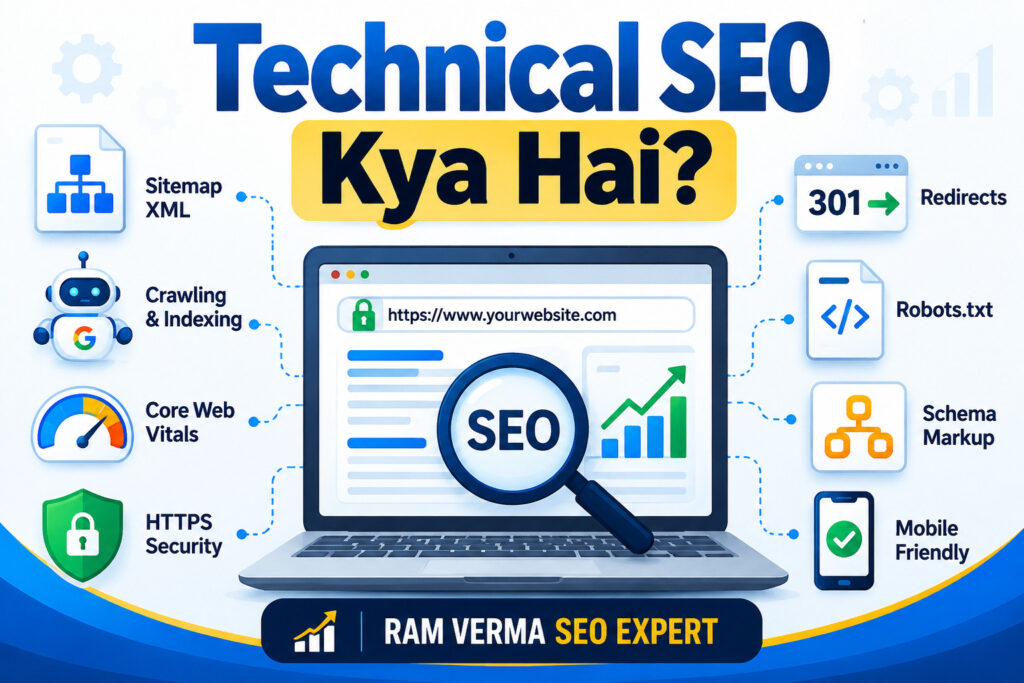
Aaj ke time mein sirf high-quality content publish karna SEO ke liye enough nahi hai. Agar search engines website ke important pages ko properly crawl, access, understand ya index nahi kar pa rahe hain, to useful content hone ke baad bhi organic visibility affect ho sakti hai.
Yahin par Technical SEO important ho jata hai.
Technical SEO website ke technical structure, accessibility, performance aur search-engine accessibility ko optimize karne ka process hai. Isme crawling, indexing, XML Sitemap, robots.txt, HTTPS, mobile experience, Core Web Vitals, URL structure, redirects, canonicalization, structured data aur website architecture jaise important areas cover hote hain.
Simple words mein:
Technical SEO = Website ki technical foundation ko strong banana, taaki search engines important pages ko efficiently discover aur process kar saken aur users ko better experience mile.
Technical SEO Kya Hai?
Technical SEO, SEO ka woh part hai jisme website ke technical aspects ko optimize kiya jata hai.
Search engine ko website ke pages discover karne, crawl karne aur information process karne ki zarurat hoti hai. Agar important pages noindex hain, crawling blocked hai, redirects incorrectly configured hain ya website architecture confusing hai, to SEO performance affect ho sakti hai.
Technical SEO ke important areas hain:
- Crawling
- Indexing
- XML Sitemap
- Robots.txt
- HTTPS
- Mobile Optimization
- Website Performance
- Core Web Vitals
- URL Structure
- Canonical Tags
- Redirects
- 404 Errors
- Duplicate URLs
- Structured Data
- Internal Linking
- Website Architecture
Technical SEO Kyon Important Hai?
Maan lijiye aapne excellent article publish kiya aur Search Intent ke according optimize kiya. Lekin agar page accidentally noindex hai, resources blocked hain ya serious technical issue hai, to search engine ke liye page ko properly process karna difficult ho sakta hai.
Technical SEO ke practical benefits hain:
- Important pages discover aur crawl hone mein help.
- Indexing problems identify karna.
- Website architecture organize karna.
- Mobile experience improve karna.
- Performance, broken links aur redirects identify karna.
- Search engines ko website structure samajhne mein help.
Technical SEO ranking ki guarantee nahi deta. Content quality, relevance, authority, links aur user experience bhi important hain.
Technical SEO vs On-Page SEO
Technical SEO aur On-Page SEO dono important hain, lekin dono ka focus alag hota hai.
| Technical SEO | On-Page SEO |
|---|---|
| Website ke technical foundation par focus | Individual page ke content aur elements par focus |
| Crawling aur indexing | Search Intent aur content optimization |
| XML Sitemap aur robots.txt | SEO Title aur Meta Description |
| HTTPS, speed aur Core Web Vitals | Headings aur content optimization |
| Canonicalization aur redirects | Keyword placement aur topical relevance |
| Website-level optimization | Page-level optimization |
| Search engines ko website access/process karne mein help | Page ko users aur Search Intent ke liye relevant banana |
Simple Formula
Technical SEO = Website Foundation
On-Page SEO = Page Optimization
Off-Page SEO = Website Authority
Teeno milkar SEO foundation ko stronger banate hain.
Simple Example
Aapke “Technical SEO Kya Hai?” article ka SEO Title, headings, content aur Search Intent optimize karna On-Page SEO hai.
Page ko crawlable rakhna, proper URL, HTTPS, sitemap aur technical accessibility maintain karna Technical SEO hai.
1. Crawling Kya Hai?
Crawling ka matlab search engine systems ka website ke pages ko discover aur access karna hai.
Technical audit mein check karein:
- Important pages crawlable hain.
- Important sections accidentally blocked nahi hain.
- Internal links working hain.
- Crawl-related errors identify kiye gaye hain.
Google Search Console ka Page Indexing report crawling aur indexing-related issues investigate karne mein useful hai.
2. Indexing Kya Hai?
Crawling aur indexing same cheez nahi hain.
Crawling page ko discover aur access karna hai, jabki indexing mein search engine page ki information ko process karke apne index mein store kar sakta hai.
Crawled ≠ Automatically Indexed
Agar important page search results mein appear nahi ho raha hai, to URL Inspection tool se status investigate karein.
Check karein:
- Accidental noindex nahi hai.
- Page accessible hai.
- Appropriate canonical signal hai.
- Major technical barrier nahi hai.
3. XML Sitemap
XML Sitemap search engines ko website ke important URLs discover karne mein help kar sakta hai.
Example:
example.com/sitemap.xml
Sitemap mein important URLs logically include karein. Unnecessary, broken ya irrelevant URLs ko blindly include na karein.
Google Search Console mein sitemap submit karke uska status monitor kiya ja sakta hai.
4. Robots.txt
Robots.txt website ke root level par available file hoti hai jo crawlers ke liye crawling instructions define kar sakti hai.
Example:
example.com/robots.txt
Galat configuration se important URLs ya resources ki crawling affect ho sakti hai. Isliye robots.txt change karne se pehle uske impact ko samajhna important hai.
5. HTTPS Security
HTTPS website aur browser ke beech encrypted connection establish karne mein help karta hai.
Technical audit mein check karein:
- HTTPS properly working hai.
- HTTP to HTTPS redirect correct hai.
- Mixed-content issues nahi hain.
- URL versions unnecessary duplication create nahi kar rahe.
6. Mobile-Friendly Website
Aaj website ka mobile experience ignore karna practical SEO approach nahi hai.
Check karein:
- Text readable hai.
- Buttons easily clickable hain.
- Content properly visible hai.
- Images correctly display ho rahi hain.
- Important content mobile par available hai.
Responsive design different screen sizes par website ko properly display karne mein help karta hai.
7. Website Speed
Slow pages user experience ko negatively affect kar sakte hain.
Performance audit mein commonly check kiya jata hai:
- Large images
- Unused CSS
- Unnecessary JavaScript
- Excessive plugins
- Server response
- Browser caching
- Image formats
- Third-party scripts
Google PageSpeed Insights useful tool hai.
Sirf 100/100 score ko goal banana zaroori nahi hai. Real-user experience aur important pages ki actual performance ko context ke saath analyse karna better approach hai.
8. Core Web Vitals
Core Web Vitals user experience metrics ka important set hain:
- LCP – Largest Contentful Paint
- INP – Interaction to Next Paint
- CLS – Cumulative Layout Shift
LCP loading experience, INP responsiveness aur CLS visual stability ko measure karta hai.
Technical audit mein in metrics ko important templates aur pages ke context mein monitor karna useful hai.
9. SEO-Friendly URL Structure
URL users aur search engines ko page ke topic ko understand karne mein help kar sakta hai.
Example:
example.com/technical-seo-guide
Ye generally is type ke URL se easier to understand hai:
example.com/page?id=12345
Best practices:
- Short aur descriptive structure rakhein.
- Unnecessary parameters avoid karein.
- Logical words use karein.
- Consistent URL structure maintain karein.
Existing URLs ko bina reason baar-baar change na karein. URL change karne par redirects aur indexing implications ho sakte hain.
10. Canonical Tags
Jab same ya very similar content multiple URLs par available ho, canonicalization useful ho sakti hai.
Canonical tag search engines ko preferred URL version indicate karne ka signal provide karta hai.
Lekin canonical tag ko har duplicate-content situation ka automatic solution nahi samajhna chahiye.
Actual URL structure, content relationship aur website architecture ko samajhna zaroori hai.
11. Redirects
Redirect users aur crawlers ko ek URL se doosre URL par move karne ka mechanism hai.
Permanent URL changes ke case mein 301 redirect commonly use kiya jata hai.
Old URL → New URL
Audit mein check karein:
- Redirect chains
- Redirect loops
- Unnecessary redirects
- Broken redirects
Relevant new destination available ho to old URL se appropriate redirect consider kiya ja sakta hai.
12. 404 Errors
404 response generally indicate karta hai ki requested resource available nahi hai.
Har 404 automatically major SEO problem nahi hota.
Lekin agar important page accidentally remove ho gaya hai, valuable backlinks hain ya users regularly us URL par aa rahe hain, to situation investigate karni chahiye.
Relevant replacement page available ho to appropriate redirect consider kiya ja sakta hai.
13. Duplicate Content aur Duplicate URLs
Duplicate content ya similar content multiple URLs par available hone se Technical SEO complicated ho sakta hai.
Possible causes:
- HTTP/HTTPS variations
- www/non-www versions
- URL parameters
- Multiple URL formats
- Similar category structures
- Duplicate page versions
URL consolidation, canonicalization aur appropriate redirects useful solutions ho sakte hain.
14. Structured Data aur Schema Markup
Structured data search engines ko page content ko machine-readable format mein understand karne mein help kar sakta hai.
Schema.org commonly used vocabulary hai.
Examples:
- Article
- Product
- Organization
- Local Business
- Breadcrumb
- Event
- FAQ
Structured data relevant content par correctly implement karein. Irrelevant ya misleading structured data use nahi karna chahiye.
15. Internal Linking aur Website Architecture
Logical website structure ka example:
Home → Category → Subcategory → Article
Internal links related pages ko connect karte hain aur users aur search engines ko content relationships samajhne mein help kar sakte hain.
Important pages ko relevant sections se internally link karna navigation aur discoverability ke liye useful hai.
Practical Example: Mere Blogger Par 105 Published Articles
Maan lijiye mere Blogger website par 105 articles already published hain.
Main sirf ye nahi dekhunga ki “105 articles publish ho gaye hain.”
Technical SEO perspective se main check karunga:
105 Articles → URLs → Crawlability → Indexing → Sitemap → Internal Linking → Errors
Agar 105 mein se kuch important articles Google Search Console mein indexed nahi hain, to pehle identify karunga:
- Kaunse URLs index nahi hue?
- Kya page accidentally noindex hai?
- Kya URL accessible hai?
- Kya canonical issue hai?
- Kya internal links se page connected hai?
- Kya sitemap mein URL appropriately present hai?
- Kya koi technical barrier hai?
Maan lijiye “SEO Strategy Kya Hai?” article expected visibility nahi de raha.
Main turant article rewrite nahi karunga.
Pehle check karunga:
URL Accessibility → Indexing Status → Canonical → Sitemap → Internal Links → Page Experience
Agar technical issue nahi milta, tab On-Page SEO, Search Intent, Content Quality aur Authority ko separately analyse karunga.
Yahi difference hai sirf article publish karne aur professionally SEO audit karne ke beech.
Technical SEO Audit: Professional Priority Framework
Professional audit mein har issue ko same priority nahi di jati.
Simple framework:
Problem → SEO Impact → Fix Priority → Recommended Action
High Priority
- Important page accidentally noindex
- Important URLs blocked from crawling
- Migration ke baad indexing problems
- HTTPS/redirect configuration issue
- Important pages inaccessible
Medium Priority
- Broken internal links
- Redirect chains
- Poor internal linking
- Duplicate URL variations
- Important templates par performance issues
Lower Priority
- Minor technical inconsistencies
- Non-critical URL cleanup
- Small optimization opportunities
Priority website ke size, business value, traffic, affected URLs aur actual impact ke according change ho sakti hai.
Foreign Client Ka Practical Scenario
Maan lijiye ek foreign client ki website redesign ke baad organic traffic lose karti hai.
Sirf “traffic down hai” report karna enough nahi hoga.
Professional audit flow:
Traffic Drop → Technical Audit → Indexing Check → Redirect Check → Sitemap → Canonical → Internal Links → Priority Fixes
Maan lijiye redesign ke baad important URLs change hue aur old URLs ke redirects properly configured nahi hain.
Recommendation:
Old URL → Relevant New URL
Uske baad affected URLs ki indexing aur organic performance monitor ki jayegi.
Client report ka practical format:
Issue → SEO Impact → Priority → Recommended Fix → Monitoring
Yahi approach Technical SEO ko sirf tool-reporting se practical client service mein convert karti hai.
Step-by-Step Technical SEO Audit
Step 1: Google Search Console
Page Indexing, Sitemaps aur URL Inspection reports dekhein.
Step 2: Crawling
Important pages crawlable hain ya nahi check karein.
Step 3: Sitemap
XML Sitemap available hai aur important URLs appropriately included hain ya nahi dekhein.
Step 4: Robots.txt
Important sections accidentally blocked to nahi hain, verify karein.
Step 5: Mobile
Navigation, readability, buttons aur content display check karein.
Step 6: Performance
Important pages ko PageSpeed Insights jaise tools se test karein.
Step 7: HTTPS
Secure version aur redirects verify karein.
Step 8: Broken Links & Redirects
404 errors, redirect chains aur loops identify karein.
Step 9: Canonicalization
Important pages ke canonical signals logically configured hain ya nahi dekhein.
Step 10: Structured Data
Implemented schema ko relevant validation tools se check karein.
Advanced Technical SEO: Foreign Client Projects
Small business website aur large international website ka Technical SEO audit same depth ka nahi hota.
Large ya international projects mein kuch additional areas important ho sakte hain.
JavaScript SEO
Important JavaScript-loaded content ki rendering aur accessibility test karna useful hai.
Website Migration
Domain change, redesign ya URL structure change ke time redirects, canonical tags, sitemap aur indexing carefully monitor karein.
International SEO
Multiple countries ya languages target karne wali websites mein URL structure aur hreflang implementation important ho sakte hain.
Large Website Architecture
Large websites mein crawl efficiency, duplicate URLs, faceted navigation aur internal linking structure important ho jata hai.
Log File Analysis
Large technical audits mein server logs se search-engine crawler behavior ko understand karne mein additional insight mil sakta hai.
Ye advanced areas har small website ke liye mandatory nahi hain. Audit depth website ke size aur business requirements ke according decide karein.
Technical SEO Ke Important Tools
Google Search Console — indexing, crawling, sitemap aur search performance monitoring.
Google PageSpeed Insights — performance aur Core Web Vitals analysis.
Google Rich Results Test — structured data testing.
Screaming Frog — crawling, broken links, redirects aur technical analysis.
Semrush — Technical Site Audit aur broader SEO analysis.
Ahrefs — technical SEO ke saath backlink aur competitor analysis.
Tool data ko blindly accept karne ke bajay actual website context ke saath interpret karna important hai.
Technical SEO Kya Hai is important for improving website crawling, indexing, technical performance, and search visibility. Understanding Technical SEO Kya Hai helps in identifying technical issues and improving overall website SEO.
Technical SEO Mein Beginners Ki Common Mistakes
- Bina samjhe robots.txt modify karna.
- Har 404 ko major SEO problem samajhna.
- PageSpeed score ko ranking ka direct measurement maan lena.
- Unnecessary plugins install karna.
- Bina migration plan ke URLs change karna.
- Irrelevant pages par schema lagana.
- Mobile experience ignore karna.
- Technical SEO ke baad content quality aur Search Intent ignore karna.
Professional approach mein pehle problem identify karein, phir impact evaluate karein aur uske baad fix implement karein.
Technical SEO Aur Google Ranking Ka Relationship
Technical SEO website ki SEO foundation ko strong banane mein help karta hai, lekin ranking ki guarantee nahi deta.
Search engines ko pages discover, access aur process karne mein technical accessibility help karti hai.
Sustainable SEO ke liye:
Technical SEO + On-Page SEO + High-Quality Content + Search Intent + Authority + Good User Experience
Technically accessible website, useful content aur satisfied Search Intent overall SEO foundation ko stronger bana sakte hain.
Final Technical SEO Checklist
✓ HTTPS properly working hai
✓ Important pages crawlable hain
✓ Important pages indexable hain
✓ XML Sitemap available hai
✓ Sitemap Search Console mein submitted hai
✓ Robots.txt correctly configured hai
✓ Website mobile-friendly hai
✓ Important pages ka performance acceptable hai
✓ Core Web Vitals monitor kiye ja rahe hain
✓ URLs clean aur logical hain
✓ Canonical tags properly configured hain
✓ Broken links check kiye gaye hain
✓ Redirects properly configured hain
✓ Duplicate URL issues investigated hain
✓ Relevant structured data implemented hai
✓ Internal linking logical hai
✓ Website architecture easy to navigate hai
✓ Search Console regularly monitored hai
Conclusion
Technical SEO website ki SEO foundation ko strong banane ka important part hai.
High-quality content tabhi effectively perform kar sakta hai jab search engines website ke important pages ko discover, access aur process kar saken.
Technical SEO aur On-Page SEO ko ek hi cheez nahi samajhna chahiye. Technical SEO website ke technical foundation aur accessibility par focus karta hai, jabki On-Page SEO individual page ke content, relevance aur Search Intent optimization par focus karta hai.
Mere 105 published Blogger articles ka example dikhata hai ki sirf content quantity enough nahi hai. Professional approach mein URLs, indexing, internal connections aur technical barriers bhi check kiye jate hain.
Foreign client projects mein issue identify karna, SEO/business impact samajhna, priority decide karna aur actionable recommendation dena important hai.
Beginner ke liye best approach hai ki website ko systematically audit karein, high-impact issues ko pehle identify karein aur fixes ko one-by-one implement karein.
Long-term SEO success ke liye website accessible, useful, relevant aur technically strong honi chahiye.